How QuickTrack works: SEF integration and monthly timeline
From Kwantu setup and SIP onboarding to collection, review and the following month’s official reporting deadline.
Last updated 5 days ago
QuickTrack is the output-tracking module in Quicksticks. It helps SIPs collect figures and evidence, review them and prepare approved totals for Kwantu. Kwantu remains the official SEF reporting system.
First: set up once, then prepare your team
- Complete the Kwantu setup. Confirm Sites, Localities, managing organisations and Reporting Templates, including the indicators linked to each Locality.
- Complete the onboarding wizard. Upload fresh SITE01, API01 and API03 exports, check the configuration and assign collectors where applicable. Choose the starting review setting and submit. Follow the onboarding guide with screenshots.
- Brownie Points checks and migrates the setup. The exports and confirmed choices are used to prepare the SIP’s workspace, people, Localities and indicator configuration. Any mismatches are resolved before handover.
- The workspace admin accepts their invitation. Check the imported setup and agree any optional extra reviewers, evidence instructions or questions. These extras do not need to delay using the agreed starting setup. Configuration guide.
- Invite the team and practise. Invite collectors and reviewers, check that each person sees the correct Localities, and practise capturing, requesting a correction and reviewing again. Invitation guide.
For training, mark practice records TEST and tell Brownie Points which Localities, indicators and periods were used. Wait for cleanup confirmation before live reporting. A TEST label alone does not exclude a record from totals.
Setup and training are arranged per SIP as its migration is ready. Teams can use the illustrated Helpdesk guides and short videos on inviting the team and capturing outputs before a walkthrough or Q&A session. Plan time for access checks, practice and cleanup before the first live reporting deadline.
The monthly reporting timeline
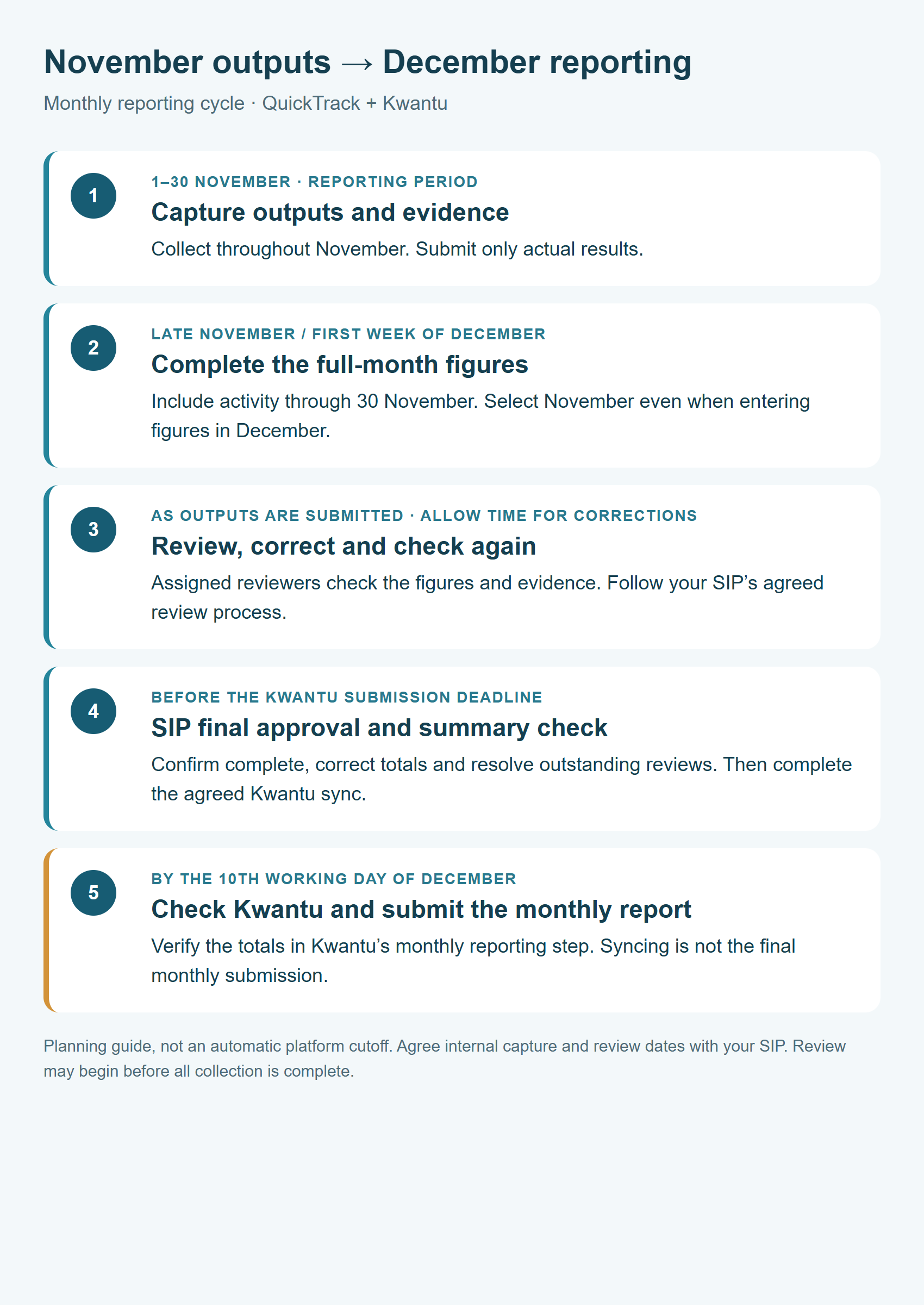
The example below covers activity from 1 to 30 November, reported to Kwantu in December. It applies to monthly indicators. Follow the agreed schedule for indicators with another frequency.
Keep the reporting period clear
A November total must cover actual activity from 1–30 November. When entering it in December, select November. Do not add a full-month total on top of the same activity already captured separately. Follow the capture guide or your agreed CSV route.
Allow time for checks
Review can begin as submissions arrive. Follow the responsibilities and review order agreed for your SIP. The SIP/M&E reviewer gives final approval after required checks and corrections. See the review guide.
Finish the official reporting step
After the SIP’s final summary check, complete the agreed Kwantu sync and verify the transferred totals. Submit the monthly report in Kwantu by the 10th working day of the following month, following the official SEF/IDC calendar.
Syncing is not the same as submitting the monthly report. SIP- or Partner-level indicators outside Locality Reporting Templates may need separate entry. Follow Final checks and Kwantu sync.
Agree internal dates before the first cycle
Set an internal capture deadline, review/correction deadline and final SIP check early enough to allow the Kwantu handover before its submission deadline. The first week of the following month is a typical capture window, not an extra extension to the official deadline. Confirm your workspace’s capture window with Brownie Points; this timeline describes the reporting process, not an automatic platform cutoff.
Was this helpful?
Still need help? Ask the team